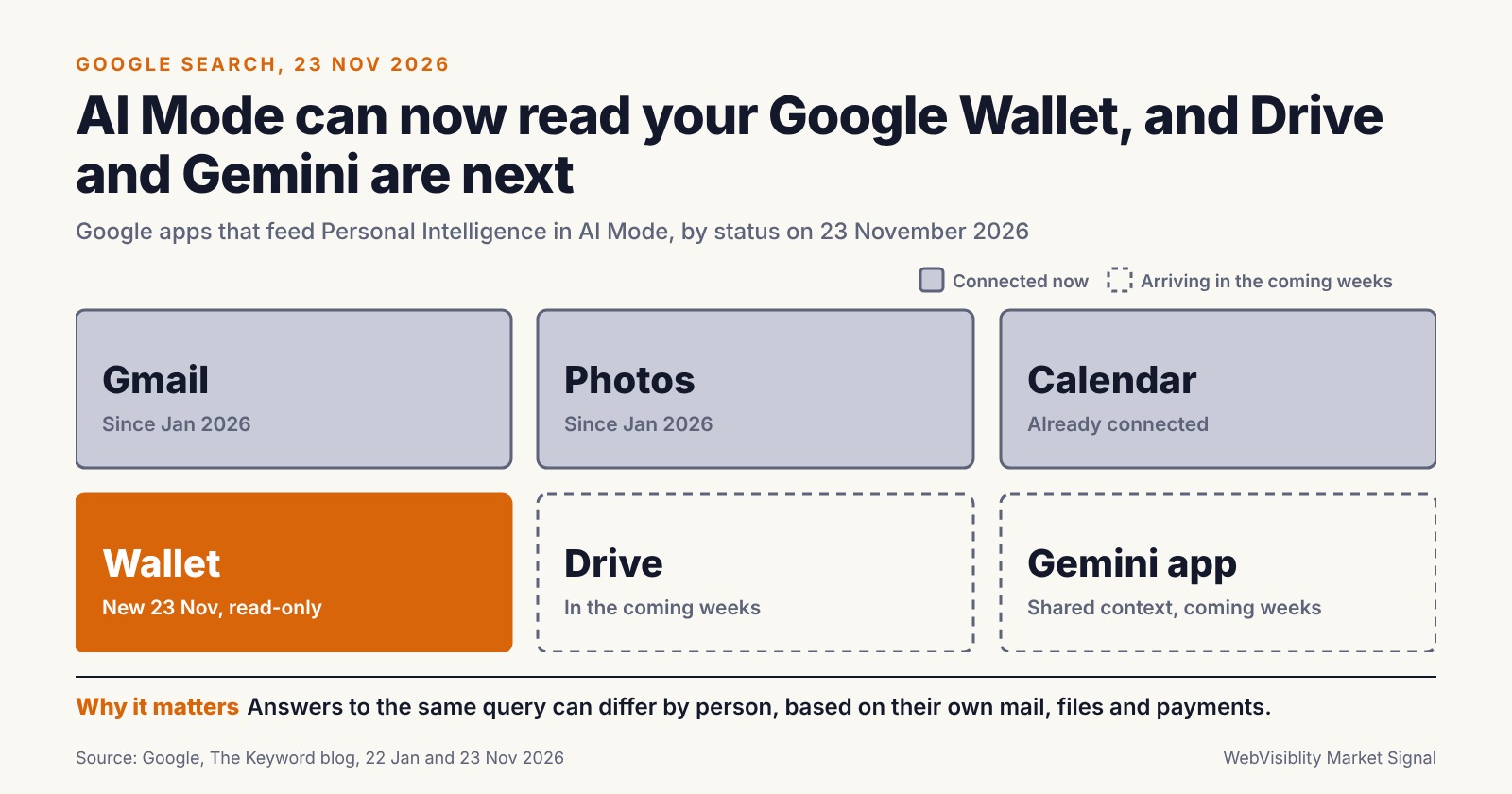
Google Search is pulling more of a person's own data into its AI answers. Starting 23 November, users can opt in to connect Google Wallet to Personal Intelligence in AI Mode, with Drive and the Gemini app following in the coming weeks. Google also said AI Overviews and AI Mode will give more personally relevant responses based on a user's recent search context. Wallet access is read-only: AI Mode cannot move or manage money.
At a glance
| New connection, rolling out 23 Nov | Google Wallet, read-only |
|---|---|
| Next, in the coming weeks | Drive and the Gemini app |
| Already connected | Gmail, Calendar and Photos |
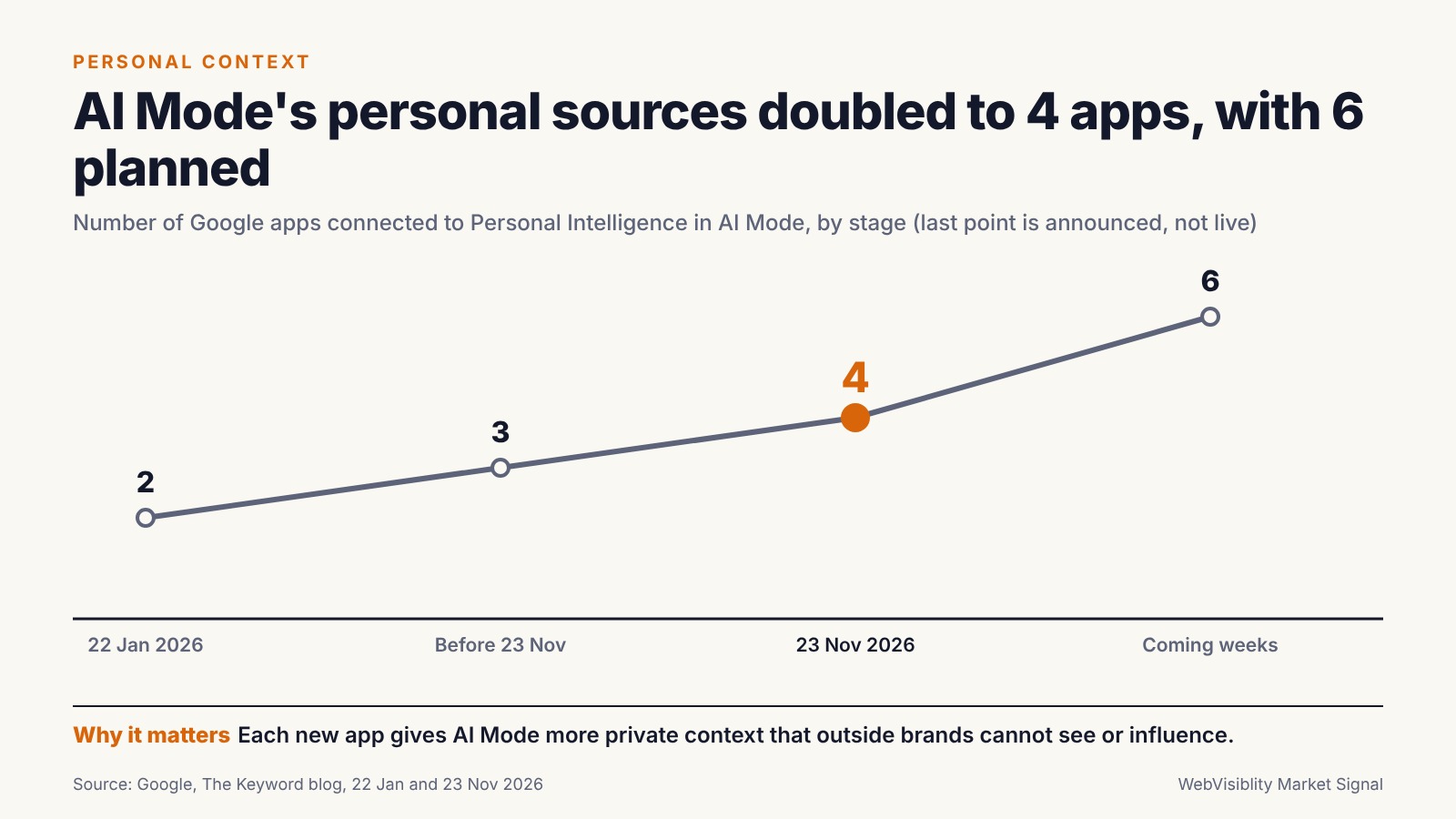
| Apps once Drive and Gemini arrive | 6, counted from Google's list |
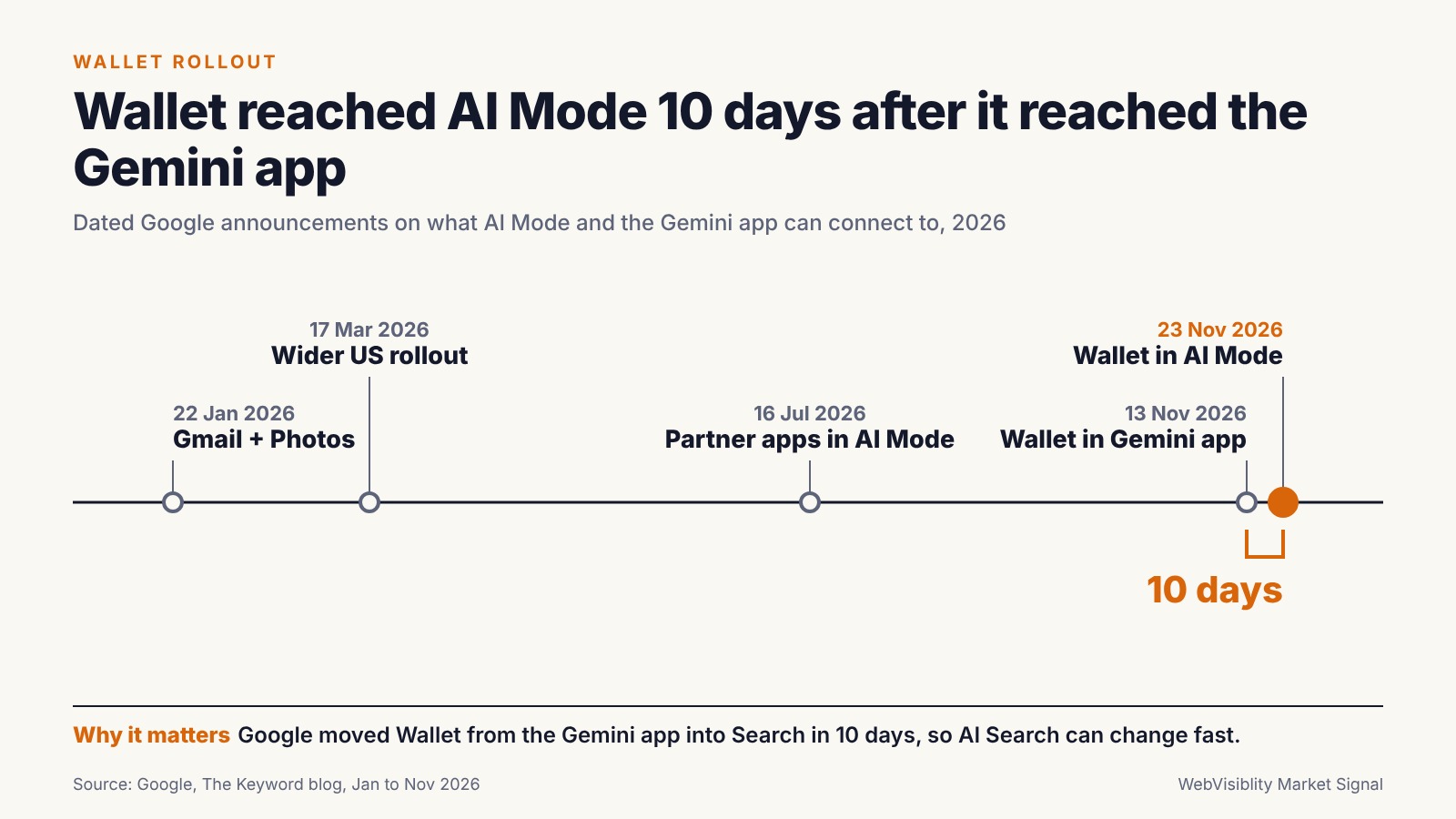
| Days from Wallet in Gemini to Wallet in AI Mode | 10, from 13 November to 23 November |
| Who controls it | The user, opt in and off at any time |
Do this today
Tick each step as you do it. Your ticks stay on this device. See the full list.
For marketers
For software buyers and IT teams
The signal
- Wallet joins as a source: AI Mode can only read information from accounts and cannot move, manage or invest money.
- Drive is next. TechCrunch reports Google pitched it for information scattered across documents and spreadsheets, such as a tax-season plan.
- Context will carry over: ideas explored in the Gemini app will continue in AI Mode without starting over, and the other way round.
- AI Overviews change too: answers will be tailored to your recent search context, not only to connected apps.
- A "Personalization" icon under tailored answers will soon show which context AI Mode used.
- Google's November post does not state which countries, languages or subscription plans get the new connections.
Which of these are you?
Tap the one that fits you best. We show what this story changes for you.
What happened
Robby Stein, VP of Product for Google Search, announced the update in a post titled "A more tailored Google Search that's uniquely yours" on 23 November. The headline change is a new data source. Users can opt in to connect Google Wallet to Personal Intelligence, the feature that lets AI Mode draw on a person's own Google apps. Google says those apps already include Gmail, Calendar, and Photos, and that support for Drive and the Gemini app will follow in the coming weeks. TechCrunch, SSBCrack and Techloy each reported the same set of apps.
The Wallet link is narrow by design. Google says AI Mode can only read information from a user's accounts and cannot move, manage or invest money. TechCrunch lists the intended uses as tracking financial goals, cutting everyday spending and making better use of credit card rewards. The same Wallet connection reached the Gemini app first: Google opened it to all Gemini app users in the U.S. on 13 November, ten days earlier.
Two further changes reach beyond connected apps. Google says people will see more personally relevant responses in AI Overviews and AI Mode, based on what they searched recently. And a new "Personalization" icon below tailored answers will soon show what context was used. Users manage all of this from Search Personalization, then Connected Apps.
This builds on a feature first launched in January, when Google AI Pro and Ultra subscribers in the US could connect Gmail and Google Photos to AI Mode in English. In March Google widened Personal Intelligence in the US and said it was for personal Google accounts, not Workspace business, enterprise or education users. The November post does not say whether those limits still apply.
How a personal AI Mode answer is built
- 1Opt in
The user connects apps in Search Personalization.
- 2Read
AI Mode reads Gmail, Calendar, Photos and Wallet, read-only.
- 3Add history
Recent searches shape AI Overviews and AI Mode.
- 4Answer
The response is tailored, with a Personalization icon coming soon.
Timeline
AI Mode can connect Gmail and Google Photos for AI Pro and Ultra subscribers in the US.
Personal Intelligence expands in the U.S. across AI Mode, the Gemini app and Gemini in Chrome.
AI Mode adds partner apps such as Instacart and Canva, separate from Personal Intelligence.
Google Wallet connects to the Gemini app for all Gemini app users in the U.S.
Wallet connects to Personal Intelligence in AI Mode; Drive and the Gemini app are due in the coming weeks.
“You choose if and when you opt in, and you can turn those connections on or off at any time.”
Who is affected
Answers are tailored to recent search context, so logged-out checks show only a baseline.
Brands a person previously purchased can shape what they are shown.
Not covered as of March, per Google's note on Workspace accounts.
Wallet data can steer spending and card-reward answers.
Why it matters
There is less and less of a single "Google answer" to check. With connected apps and recent search context shaping responses, two buyers who type the same question into AI Mode can get different results. A rank tracker or a prompt test run from a clean, logged-out browser now shows a baseline, not what a signed-in prospect sees. Teams that report AI visibility to leadership should say so plainly and test with several realistic personas rather than one generic query.
The data being added favors brands that already live in the buyer's own records. Google's March post gave the example of a brand of sneakers you previously purchased, and Wallet now adds purchase and card data. For B2B the effect is indirect for now, since Google said in March the feature was not for Workspace business accounts. But the direction is clear: past receipts, calendar invites and emails become inputs to the answer. A vendor that a buyer has already paid, met or emailed has a signal that a newcomer cannot buy.
The speed matters too. Wallet went from the Gemini app to Search in 10 days, and Drive is promised within weeks. Marketers who read AI Mode as a fixed surface will keep misreading it. Public, crawlable content still decides which brands AI Mode knows about at all; personal context then decides which of those known brands a specific person sees first.
By the numbers
What to do now
For marketers
- Test key buyer questions in AI Mode with several signed-in test accounts, not only logged out.
- Label AI visibility reports as baseline results that personal context can change.
- Keep public product, pricing and comparison pages complete, since they decide whether AI Mode knows the brand at all.
- Watch for the Personalization icon and use it to see which context shaped an answer.
For software buyers and IT teams
- Review which apps are connected in Search Personalization before relying on AI Mode recommendations.
- Remember that a tailored answer may favor vendors already in your inbox or receipts.
- Run important vendor searches with personalization off to see the wider field.
Printable, one page, 10 checks. Enter your email and it opens right away.
We email you a copy. We never share your email and never send you sales emails.
Pick one. It takes 5 seconds and helps more people find these briefings. Your checklist opens straight after.
Have a work email? Use it instead and the checklist opens straight away.
Open it, then save it as a PDF or print it.
Know someone who would find this useful?
These steps are our recommendations based on this news, not statements from the companies involved.
What to watch
- Drive and Gemini timing. Whether Drive and the Gemini app connections arrive in the coming weeks as promised, and in which countries.
- Workspace access. Whether Google opens Personal Intelligence to work accounts, which would put company documents into AI Mode answers.
- The Personalization icon. Once live, it will show what context shaped an answer, a useful audit tool for marketers testing their own visibility.
- Plans and markets. The November post does not name eligible plans or countries; a help page or later post should settle it.
Questions readers ask
Can Google AI Mode see my Google Wallet?
Only if you opt in. From 23 November Google lets users connect Google Wallet to Personal Intelligence in AI Mode, and the access is read-only.
Can AI Mode move or spend my money?
No. Google says AI Mode can only read information from your Wallet accounts and cannot move, manage or invest money.
When will AI Mode connect to Google Drive?
In the coming weeks, according to Google. Its 23 November post says Drive and the Gemini app will follow the Wallet connection, without giving a date.
Which apps does Personal Intelligence in AI Mode use?
Gmail, Calendar, Photos and now Wallet, per Google's announcement. Drive and the Gemini app are next, which would make six.
How do I turn off personalization in Google AI Mode?
Open Search Personalization and select Connected Apps. Google says you can turn those connections on or off at any time.
Will AI Overviews give different answers to different people?
Increasingly, yes. Google says AI Overviews and AI Mode will give more personally relevant responses tailored to each user's recent search context.
Does Personal Intelligence work with Google Workspace accounts?
As of March it did not. Google said it was for personal Google accounts, not Workspace business, enterprise or education users; the November post does not update this.
Companies in this story
Sources
Researched, fact-checked and edited by the Market Signal desk. Read our editorial standards. Spotted an error? Email hello@webvisiblity.com and we will correct it.